Annual Sales Declaration SCPP SPPF: The Complete Guide to Collecting Your Neighboring Rights

Annual Sales Declaration SCPP SPPF: The Complete Guide to Collecting Your Neighboring Rights as a Producer
In France, 246 million euros were collected from private copying levies in 2024. Part of that money is earmarked for you as a phonogram producer. But if you don’t file your annual sales declaration with SCPP or SPPF, that money simply falls into oblivion — reinvested in cultural programs or filed as “undistributed.” In other words, you work, you produce, you sell… and you leave money on the table.
This guide shows you exactly how the annual sales declaration works, step by step, so you finally collect all your producer neighboring rights. We will also cover the pitfalls that cause hundreds of producers to lose rights every year, and how to avoid them.
Why the Annual Sales Declaration Is Essential
The annual sales declaration is mandatory for all phonogram and videogram producers in France. Behind this administrative obligation lies a major financial stake: it is the key to receiving your neighboring rights.
Without this declaration, SCPP and SPPF have no way of knowing how many sales your tracks generated. Result: your share of equitable remuneration and private copying stays blocked. It is not lost per se — it is redistributed elsewhere or classified as “undistributed.”
Concretely, if you have tracks playing on radio, being broadcast in bars, restaurants, clubs, or on streaming platforms, you are generating neighboring rights. But those rights will only be paid out if you have declared your phonograms and your sales.
Key takeaway: No declaration = no rights. It is that simple (and that brutal).
The Two Types of Neighboring Rights Revenue for Producers
As a phonogram producer, you receive two types of revenue through your neighboring rights. Both depend directly on your annual sales declaration.
Equitable Remuneration
Equitable remuneration is collected every time your music is broadcast in a public space. That includes radio stations, bars, restaurants, clubs, nightclubs, shopping malls, waiting rooms — any venue open to the public.
This remuneration is collected by SPRE (Societe pour la Perception de la Remuneration Equitable) and redistributed through SCPP or SPPF depending on which organization you belong to.
Private Copying
Private copying is a levy charged on all blank media sold in France: USB drives, hard drives, smartphones, tablets, blank CDs, etc. The idea is simple — since people copy music onto these devices, creators and producers must be compensated.
In 2024, private copying levies reached 246 million euros in France, up from 234 million in 2023. This is a massive amount, collected by Copie France, and split between artists, producers, and cultural programs.
Key takeaway: Private copying represents a considerable source of revenue for independent producers. Not declaring your sales means giving up your share of this pie.
How Private Copying Is Distributed
Private copying distribution follows a precise formula defined by the French Intellectual Property Code. It is divided into three equal shares.
First third — Performing Artists: this share is redistributed through ADAMI and SPEDIDAM to singers, musicians, and other performers.
Second third — Producers: this is your share. It is redistributed through SCPP or SPPF to phonogram producers who have declared their sales.
Third third — Cultural programs: this portion funds festivals, cultural events, training, and arts education initiatives. It is a legal requirement (25% of total collection goes to these programs).
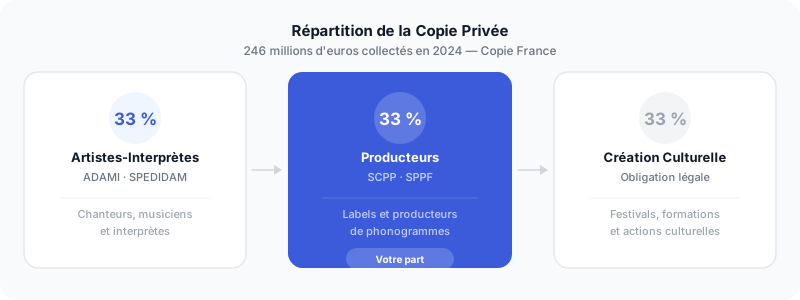
If you don’t file your declaration, your share of the second third is not paid out. It is either stored temporarily or reallocated. Either way, you miss out.
For a deep dive into all the revenue sources available to an independent producer (including neighboring rights), check out Tarik Hamiche’s book: Le Secret pour Vivre de sa Musique — a complete action plan to structure and maximize your music revenue.
The 5 Steps of the Annual Sales Declaration
Here is the complete process to declare your sales and collect your producer neighboring rights. Follow these steps in order and you will never leave a cent on the table again.
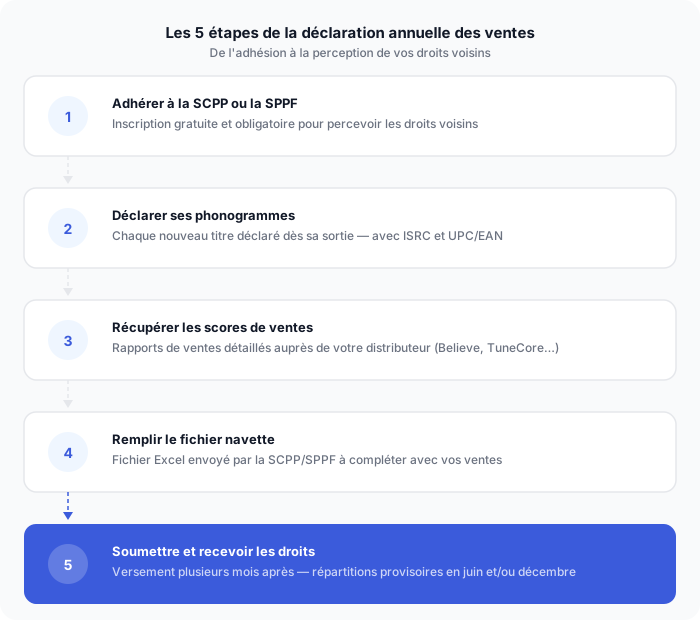
Step 1 — Join SCPP or SPPF
First things first: you must be a member of one of these two organizations. They are the ones that collect and distribute neighboring rights for phonogram producers.
SCPP (Societe Civile des Producteurs de Phonogrammes): historically linked to the majors and large independent labels. It includes Universal, Sony, Warner, and many structured independents.
SPPF (Societe des Producteurs de Phonogrammes en France): more geared toward independent producers and labels. This is often the most relevant choice when you are starting out.
Membership is free in both cases and is a mandatory prerequisite for declaring your sales. You cannot receive neighboring rights without being a member.
Step 2 — Declare Your Phonograms
Each new track or album you produce must be individually declared to SCPP or SPPF. This is a crucial and often overlooked step.
The rule is simple: as soon as a new track is released, file a phonogram declaration. Don’t wait until the end of the year. If a track is not declared to your organization, it simply will not appear in the sales declaration file. You won’t be able to declare its sales, and you won’t receive any rights on it.
To declare a phonogram, you will need the track title, year of production, audio file or listening link, credits (songwriter, composer, performer, producer), and ideally the ISRC and UPC/EAN codes.
Step 3 — Retrieve Your Sales Scores
Sales scores are the data your digital distributor provides. Whether you use Believe, TuneCore, DistroKid, iMusician, or any other aggregator, each distributor makes detailed sales reports available to you.
These reports contain the essential information: artist name, track title, UPC/EAN code, year of production, quantities sold, and sales scores per platform.
Caution: do not include certain types of sales in your declaration. Promotional sales and off-circuit sales must not be counted. Only actual commercial sales count.
Step 4 — Fill in the Shuttle File
SCPP or SPPF sends you a shuttle file — a pre-filled Excel file listing the tracks you have declared in your catalog. Your job is to complete this file with the sales scores retrieved in the previous step.
Before filling it in, carefully check that all your tracks appear in the file. If tracks are missing, they were not declared (go back to step 2 to declare them immediately).
The shuttle file typically consists of an explanatory guide, two Excel files (“Sales by format” and “Unit sales”), and a PDF summary of your phonogram declarations.
This is exactly the kind of juggling between Excel files, distributor reports, and shuttle files that Muzisecur automates for you. No more navigating between 15 documents — everything is centralized and pre-filled.
Step 5 — Submit and Receive Your Rights
Once the shuttle file is completed, send it back to SCPP or SPPF before the indicated deadline. SPPF members in particular must be up to date with their track/format declarations before mid-February so that their entire catalog appears in the sales files.
Rights payments arrive several months after submission, often in the middle of the following year (provisional distributions take place in June and/or December depending on the organization). Amounts vary based on sales volume, market share, and format type.
Key takeaway: Declare each new phonogram as soon as it is released. Not waiting until year-end guarantees your tracks will appear in the declaration files when the time comes to declare your sales.
Pitfalls and Common Errors: What Causes You to Lose Rights
Hundreds of independent producers miss out on neighboring rights every year due to avoidable mistakes. Here are the six most common pitfalls.
Not declaring your phonograms on time. This is the number one error. If you forget to declare a track to SCPP or SPPF, it will be absent from the shuttle file. No shuttle file = no sales declaration = no rights. It is that simple.
Confusing which sales to count. Be careful not to include promotional sales or off-circuit sales in your declaration. Only regular commercial sales should be declared. A mistake here can lead to corrections, delays, or issues with your organization.
Forgetting to verify your distributor reports. The data your distributor provides is not always perfect. Tracks can be misidentified, figures can be incorrect. If you copy without checking, you risk significant underpayment.
Not joining the right organizations. This is a classic point of confusion. As a producer, you join SCPP or SPPF. As a performing artist, you join ADAMI and/or SPEDIDAM. As a songwriter-composer, you join SACEM. If you wear multiple hats (which is common when you are independent), you must join each corresponding organization.
Having unidentified phonograms. The absence of an ISRC or UPC/EAN code on your recordings prevents their identification in rights databases. Without these codes, your tracks are invisible to the distribution system.
Forgetting physical formats. Don’t limit yourself to digital. If you sell CDs or vinyl, those sales must also be declared. Many producers think “all digital” and forget their physical sales.
Key takeaway: Undeclared phonograms = permanently lost rights. Regularly verify that all your tracks are declared with SCPP or SPPF.
The 6 most common errors that cause independent producers to lose neighboring rights.
Essential Codes: ISRC and UPC/EAN
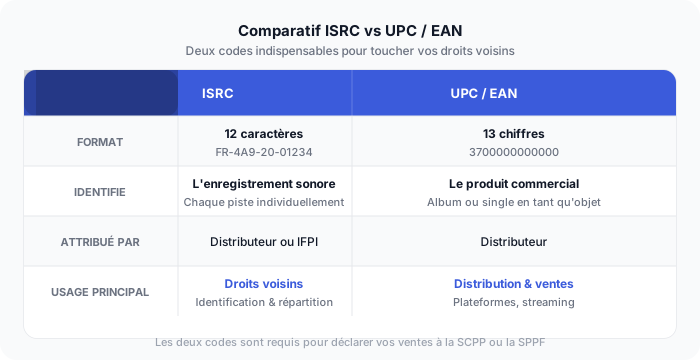
Two codes are absolutely fundamental for your recordings to be properly identified in the neighboring rights system. Without them, your tracks are invisible.
The ISRC Code (International Standard Recording Code)
The ISRC is a unique identifier assigned to each sound recording in the world. It is like a fingerprint for your music. It consists of 12 characters: 2 letters for the country, 3 characters for the registrant identifier, 2 digits for the year, and 5 digits for the sequential number. For example: FR4A92001234.
You can get an ISRC via your digital distributor (Believe, TuneCore, DistroKid, etc.) — many assign it automatically upon upload — or directly through IFPI (International Standard Recording Code).
The UPC/EAN Code (Universal Product Code / European Article Number)
The UPC/EAN code is a 13-digit barcode that identifies your commercial product — an album or single as a sold item. It is typically assigned by your distributor.
Why These Codes Are Critical
Without ISRC and UPC/EAN, your tracks cannot be properly identified in rights databases. Organizations like SCPP and SPPF use these codes to match your sales declarations with your phonograms. A missing or incorrect code means an invisible track in the system — and revenue that never reaches you.
-> Also read: ISRC Code: the complete guide for artists and producers
Automate Your Declarations with Muzisecur
If you find this entire process complex, that is normal. Juggling between organization memberships, phonogram declarations, distributor reports, Excel shuttle files, and deadlines takes time and generates errors.
That is exactly why Muzisecur was created. This SaaS platform, developed by Tarik Hamiche (a gold and platinum certified independent producer), automates the entire neighboring rights declaration process.
Specifically, Muzisecur handles your organization memberships (SCPP, SPPF, ADAMI, SPEDIDAM, SACEM), automatic declaration of your works and phonograms, verification requests if amounts seem abnormally low, and real-time tracking of your rights and payments.
The process that normally takes 15 to 30 minutes per track (when everything is well organized) becomes nearly instant. More importantly, you no longer risk forgetting a declaration or missing a deadline.
For a deeper look at structuring your label and automating your entire administrative management, check out Tarik Hamiche’s book: Creer son Label de Musique — the step-by-step guide from creation to daily management.
FAQ: Annual Sales Declaration and Neighboring Rights
Some of my tracks don’t appear in the shuttle file. Why?
Your tracks probably were not declared to SCPP or SPPF as phonograms. Only previously declared tracks appear in the shuttle file. You must declare the missing tracks immediately so they are included in the next distribution cycle.
Should I declare streams in my annual sales declaration?
Yes, absolutely. Streams on Spotify, Apple Music, Deezer, and other digital platforms count as sales scores provided by your distributor. They are full-fledged digital “sales” and must be included in your annual declaration. Your distributor provides this data as detailed reports that you integrate into the shuttle file.
Is the annual sales declaration retroactive?
Yes, it is possible to declare previous years, but with limits — generally 3 to 5 years depending on the organization. The longer you wait, the more you risk losing rights permanently. The golden rule: declare as soon as possible, every year.
What is the difference between SCPP and SPPF for an independent producer?
SCPP historically groups the majors and large independents, while SPPF is more oriented toward independent labels and producers. Membership is free in both cases. As an independent producer starting out, SPPF is often the most natural choice.
I am both a performer and a producer. How do I declare under both roles?
You must join ADAMI and/or SPEDIDAM as a performer, AND SCPP or SPPF as a producer. Your rights will be paid separately for each role. This is very common in the independent world and it is essential not to neglect either revenue source.
Conclusion
The annual sales declaration is not a simple administrative formality — it is the key to collecting your producer neighboring rights. Between equitable remuneration and private copying, the amounts at stake can represent a significant income supplement, especially when your music is regularly broadcast.
Remember the essentials: join SCPP or SPPF as soon as possible, declare each phonogram at release (not at year-end), verify your ISRC and UPC/EAN codes, retrieve your sales scores from your distributor, and fill in your shuttle file carefully.
Want to automate this entire process and never lose a cent of neighboring rights again? Discover Muzisecur — the SaaS that manages your declarations, your memberships, and the tracking of your rights, so you can focus on what matters: your music.
Related articles

ADAMI and SPEDIDAM: The Complete Guide for Performing Artists
ADAMI or SPEDIDAM? Understand the difference, register with the right organization, and finally collect your performer rights. Practical guide with steps, grants, and mistakes to avoid.

Neighboring Rights in Music: How to Collect All Your Royalties as a Producer
SCPP or SPPF? Equitable remuneration, private copying, exclusive rights: understand the 3 revenue streams from neighboring rights and stop leaving money on the table.

How to Register with SACEM as a Songwriter-Composer: Complete 2026 Guide
Every step to join SACEM, register your works, and start collecting your copyright royalties. Practical guide with required documents, costs, and mistakes to avoid.