Releasing a Single Independently: The Complete A-to-Z Checklist

Releasing a single independently is exciting. It’s the moment when weeks — sometimes months — of studio work finally come to life on the platforms. But between the master file leaving the studio and the moment your track is actually available on Spotify, Apple Music, Deezer, and the rest, there’s a list of administrative, technical, and promotional steps that many independent artists underestimate or discover in the wrong order.
The result: incomplete metadata, a forgotten ISRC code, unsigned contracts, a late SACEM registration, a botched playlist pitch submitted 3 days before the release instead of 4 weeks. Every missed step is potentially lost money or poorly protected rights.
This article is the definitive checklist: the 15 steps to release a single independently, in the right order, with the right timing. We’ll cover everything from mastering to post-release tracking. And we’ll show you how Muzisecur can automate about 80% of these steps so you can focus on what really matters: your music.
Why a checklist is essential
When you’re signed to a label, there’s an entire team — project manager, marketing lead, legal counsel, accountant, distribution manager — handling every step of the release. As an independent artist, you are all of those people at once.
The problem isn’t that these steps are individually complicated. The problem is that there are many of them, they follow a specific order, and the slightest oversight has cascading consequences:
- No ISRC? Your streams aren’t counted correctly.
- No split sheet? Your featuring can block the track’s exploitation in 6 months.
- Playlist pitch submitted too late? You miss the Spotify for Artists opportunity window.
- No SACEM registration? Your copyright royalties aren’t being collected.
A structured checklist eliminates stress and oversights. It transforms a fuzzy process into a series of concrete actions with clear deadlines.
Key takeaway: The difference between an independent artist who “releases a single” and one who nails the release is often the rigor of their upfront preparation, not the quality of their music.
Overview: the 15 steps at a glance
Before detailing each step, here’s the big picture. The 15 steps are organized into 4 phases:

Complete timeline of the 15 steps to release a single independently — steps automated by Muzisecur are identified in the legend.
| Phase | Timing | Steps |
|---|---|---|
| Preparation | D-60 to D-30 | 1. Mastering — 2. ISRC — 3. UPC — 4. Metadata — 5. Contracts |
| Distribution | D-30 to D-14 | 6. Artwork — 7. Distributor upload — 8. Release date — 9. SACEM registration — 10. Playlist pitching |
| Promotion | D-14 to Release Day | 11. Radio promo — 12. Social media content — 13. Pre-save |
| Launch and Tracking | Release Day to D+30 | 14. Campaign activation — 15. Performance tracking |
Phase 1: Preparation (D-60 to D-30)
This is the most important phase. Everything you prepare here determines how smoothly the rest goes. If you rush the preparation, every following step becomes harder.
Step 1: Finalize the mastering
Mastering is the final step in the audio production chain. It’s the process that gives your mix its final shape: consistent levels, balanced frequency spectrum, loudness adapted to streaming standards.
What you need:
- A master file in WAV 16-bit / 44.1 kHz (CD standard) or WAV 24-bit / 44.1 kHz (recommended higher quality)
- A master optimized for streaming, with a target loudness around -14 LUFS (Spotify/Apple Music standard)
- Optionally, an alternative master for radio (slightly different loudness)
Common mistake: Sending an MP3 file to the distributor. Platforms require WAV or FLAC. Even a 320 kbps MP3 will be re-encoded and lose quality.
Key takeaway: Mastering isn’t a luxury. It’s an essential technical step. If you don’t have the budget for a mastering engineer, services like LANDR or BandLab offer AI-assisted mastering from a few euros. But a professional human master remains the standard.
Step 2: Get your ISRC code
The ISRC code (International Standard Recording Code) is your recording’s unique identifier. Without it, your streams, radio plays, and sync placements can’t be counted or compensated. It’s literally your track’s ID card in the global rights management system.
We’ve dedicated a full guide to this topic: ISRC Code: The Complete Guide for Artists and Producers.
How to get one:
- Through your digital distributor — Most (DistroKid, TuneCore, CD Baby, Muzisecur) automatically generate an ISRC on upload.
- Through SCPP or SPPF — If you’re a phonographic producer, you can get your own ISRC prefixes.
- Through your label — If you work with a label, they assign the ISRC.
Common mistake: Using the same ISRC for two different recordings (original version and remix, for example). Each version = a separate ISRC.
Step 3: Generate the UPC/EAN code
The UPC (Universal Product Code) or EAN (European Article Number) identifies the product — meaning the single, EP, or album as a release. While the ISRC identifies each track individually, the UPC identifies the package.
Why it matters:
- Digital stores require a UPC for every release
- It allows tracking sales at the product level (not just the track level)
- It’s essential for chart rankings
Most digital distributors automatically generate a free UPC. With Muzisecur, the ISRC and UPC are generated automatically when you create your release.
Step 4: Prepare the metadata
Metadata is everything that describes your track beyond the audio file itself. It’s what allows platforms to display it correctly, classify it, recommend it, and pay the right people.
Metadata checklist:
- Exact title of the track (watch out for capitalization, accents, typography)
- Artist name as it will appear on platforms (consistent with your existing profiles)
- Primary artist(s) and featuring(s) — spelling identical to what already exists on the stores
- Genre and sub-genre
- Language of the lyrics
- Complete lyrics (Spotify and Apple Music display them)
- Credits: author(s), composer(s), producer(s), mixing and mastering engineer(s)
- Desired release date
- Explicit content (yes/no)
Common mistake: Inconsistencies in the artist name. If you’re “DJ Xxxx” on Spotify and upload as “Dj xxxx” (lowercase), platforms may create a new profile instead of attaching the release to your existing one. That’s a nightmare to fix.
Key takeaway: Metadata isn’t a boring administrative detail. It determines whether your track is discoverable, whether your credits are correct, and whether the right people get paid. Take the time to verify everything.
Step 5: Sign the contracts
This is the step that nearly every independent artist skips. And it’s the one that causes the most problems 6 months, 1 year, or 3 years after release.
If other people contributed to your track — beatmaker, co-writer, featured artist, mixing engineer — you need a clear contractual framework defining who owns what, who earns what, and for how long.
Essential contracts before a release:
| Contract | When | Why |
|---|---|---|
| Split sheet | As soon as the composition is done | Defines the copyright split between co-authors/composers |
| Rights assignment contract | Before distribution | Governs the transfer of economic rights |
| Featuring contract | Before release | Clarifies rights, compensation, and exploitation |
| Production contract | Before release | Specifies master ownership and exploitation terms |
For a complete guide on each contract type, read our article: Essential Contracts for Independent Artists.
With Muzisecur, contracts are automatically generated from your release information. Split sheets, assignment contracts, featuring contracts — everything is pre-filled, compliant with French law, and electronically signable.
Key takeaway: A contract isn’t a sign of distrust. It’s a framework of trust. Without one, a verbal misunderstanding can become a dispute that blocks your track’s exploitation for months.
Phase 2: Distribution (D-30 to D-14)
The master is ready, the codes are in place, the contracts are signed. Now it’s time to send everything to the platforms.
Step 6: Create the artwork
The artwork (cover art) is the first thing listeners see. It’s also a technical element with precise specifications.
Technical specifications:
- Dimensions: 3000 x 3000 pixels (minimum)
- Format: JPG or PNG
- Color space: RGB (not CMYK)
- Resolution: 300 DPI minimum
- No illegible text at small size (remember the artwork is often displayed at 300 x 300 px on mobile)
What stores prohibit:
- Social media logos (Instagram, TikTok, etc.)
- Price or promotion mentions
- Blurry or pixelated images
- Explicitly sexual content
- Photos of public figures without authorization
Common mistake: Using an image found on Google without checking rights. That’s grounds for immediate rejection by stores and a legal risk.
Step 7: Upload to the distributor
Time to send everything to your digital distributor. If you don’t know which one to choose, we’ve compared the main ones in our article: Digital Distribution Comparison 2026.
What you need to upload:
- The master WAV/FLAC file
- The high-resolution artwork
- All metadata (filled in through the distributor’s form)
- The ISRC code (if you obtained it yourself)
- The UPC code (if you obtained it yourself)
Timeline: Most distributors require 2 to 4 weeks between upload and actual availability on stores. Some (like DistroKid) can be faster, but it’s better to plan generously so you don’t miss your release date.
Key takeaway: Upload everything at least 4 weeks before your target release date. This gives you a buffer in case of rejection (non-compliant artwork, incorrect metadata) and lets you pitch Spotify playlists in time.
Step 8: Set the release date
The worldwide standard for music releases is Friday. It’s the day when editorial playlists are updated, charts are recalculated, and listeners discover new releases.
Best practices:
- Friday: standard release day (New Music Friday)
- Avoid long weekends and holidays: less press coverage and less engagement
- Avoid release weeks of big artists in your genre (if possible)
- Plan at least 4 weeks between upload and release date (for Spotify pitching)
Step 9: Register your work with SACEM
If you’re a member of SACEM (or another collective management organization), you must declare your work so your copyright royalties are collected. This step is separate from distribution: distribution puts your music on platforms, SACEM collects the copyright generated by plays.
What to declare:
- The title of the work
- The authors (lyricists) and composers
- The split of shares between co-authors/co-composers
- The publisher (if applicable)
How to do it: Registration is done online through the SACEM portal. You can also register via Muzisecur, which automates the declaration from your release metadata.
Common mistake: Forgetting to register the work or doing it after release. Result: the first plays (radio, streaming) generate no copyright royalties because SACEM has no record of your work in its database.
Step 10: Pitch to editorial playlists
This is one of the most strategic steps. Editorial playlists on Spotify, Apple Music, and Deezer are the primary source for discovering new tracks. A placement in a playlist like “New Music Friday France” or “Pop n’ Fresh” can generate tens of thousands of streams in days.
How to pitch on Spotify:
- Log in to Spotify for Artists
- Go to “Music” > “Upcoming”
- Select your single (it must be uploaded at least 7 days before release, ideally 3-4 weeks)
- Fill out the pitching form: genre, mood, instruments, track story
- Submit
On Apple Music: Pitching is done via Apple Music for Artists or directly through your distributor (if the feature is included).
On Deezer: Some distributors offer built-in Deezer pitching.
Key takeaway: Pitching doesn’t guarantee placement. But not pitching guarantees you won’t be placed. It’s free, takes 15 minutes, and the potential upside is enormous.
Phase 3: Promotion (D-14 to Release Day)
Your single is uploaded, the date is set, the pitching is done. Now you need to prepare the ground so that on release day, people know about it.
Step 11: Send the radio promo
Radio remains a major promotion channel, even in the streaming era. A radio play means visibility, credibility, and most importantly neighboring rights collected by SCPP or SPPF.
Options:
- Press agent / radio promoter: the classic route. A professional sends your track to radio programmers with a press kit.
- Direct outreach: you can contact local, community, and web radio stations yourself. More time-consuming but free.
- Promo platforms: services like Musik and Film, Musicast, or Muzisecur offer professional radio outreach.
Timing: Ideally, the radio promo should go out 2 to 3 weeks before release for national radio, and 1 to 2 weeks before for local and web radio.
Step 12: Prepare social media content
A single release isn’t a one-time event — it’s a communication sequence that spans several weeks.
Typical content calendar:
| Timing | Content |
|---|---|
| D-14 | Teaser 1: announce the release date (story + post) |
| D-10 | Behind the scenes (studio, recording, mastering) |
| D-7 | 15-30 second audio snippet |
| D-3 | Artwork reveal + pre-save link |
| D-1 | Countdown / final story before the drop |
| Release Day | Official announcement + smartlink + story + reel |
| D+1 to D+3 | Reactions, thank-yous, first numbers |
| D+7 | Music video (if applicable) or acoustic version |
| D+14 | Recap / behind the scenes of the creative process |
Common mistake: Betting everything on release day. If you only communicate on the Friday of the release, you’ve already lost half your impact. Communication should start at least 2 weeks before.
Step 13: Set up the pre-save
The pre-save (or pre-add) lets listeners “save” your single before release. On release day, the track is automatically added to their library.
Why it matters:
- Pre-saves count as streams on release day
- It sends a strong signal to the platform’s algorithm
- It gives you a base of listens from the very first hours
Tools for creating a pre-save link: Linkfire, ToneDen, Feature.fm, or directly through Muzisecur which generates an integrated smartlink.
Phase 4: Launch and tracking (Release Day to D+30)
The single is out. But the work isn’t over — far from it.
Step 14: Release day, activate the campaign
On release day, everything must be ready and synchronized:
- Publish your announcement on all your social media (Instagram, TikTok, X, Facebook, YouTube Community)
- Share your smartlink (a single link that redirects to all platforms)
- Send an email to your mailing list (if you have one — and you should)
- Activate your collaborators: featuring artist, beatmaker, sound engineer — ask them to share too
- Engage your community: reply to comments, post stories in real time, go live
Common mistake: Posting once and waiting. A single release requires a minimum of 3 to 5 posts on release day across different formats (post, story, reel, comments on other posts).
Step 15: Track performance
The first weeks after release are critical. It’s time to understand what’s working, adjust your strategy, and collect data that will serve your next release.
What to track:
| Metric | Tool |
|---|---|
| Streams by platform | Spotify for Artists, Apple Music for Artists, Deezer Backstage |
| Playlist adds | Spotify for Artists (Playlists tab) |
| Radio plays | Muzicast / Muzisecur (automatic tracking) |
| Social media engagement | Native analytics (Instagram Insights, TikTok Analytics) |
| Revenue / Royalties | Distributor dashboard + Muzisecur |
Recommended checkpoints:
- D+7: first stream numbers, community reactions, playlist placements
- D+14: confirmed trend, adjust promo strategy
- D+30: full review — streams, revenue, radio, promo ROI
Key takeaway: The data from your current release is the foundation for your next one. Note what worked and what didn’t. That’s how you improve from single to single.
The typical single release timeline
Here’s a diagram summarizing the optimal single release calendar, week by week:
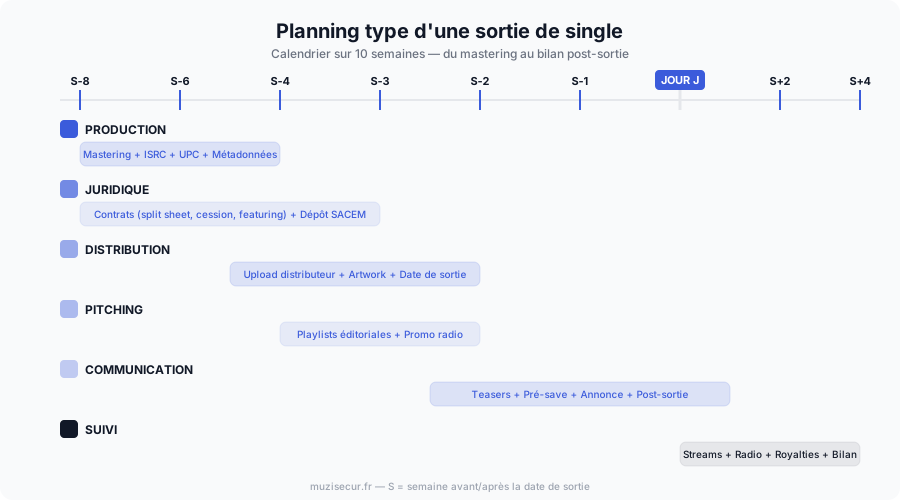
Typical 10-week timeline — each row represents an action area (production, legal, distribution, pitching, communication, tracking).
The key idea: everything overlaps. You don’t do the steps one by one sequentially. While you’re preparing metadata, you’re already getting contracts signed. While you’re uploading to the distributor, you’re launching the pitching. While you’re preparing radio promo, you’re planning social media content.
That’s precisely why the checklist is essential: it lets you see at a glance what’s done and what’s left to do.
The most common mistakes to avoid
Working with hundreds of independent artists, we’ve identified the mistakes that come up most often. Here they are, ranked by severity:
Critical mistakes (that cost you money)
- Not signing a split sheet — If your track takes off and no document defines the split, prepare for a conflict.
- Forgetting SACEM registration — Your copyright royalties simply aren’t collected. You’re working for free.
- No ISRC — Your streams and radio plays aren’t counted. We cover this in detail in our ISRC guide.
Strategic mistakes (that limit your reach)
- Pitching too late — Spotify pitching must be done at least 7 days before release. Ideally 3-4 weeks.
- Choosing a distributor at random — The differences in commissions, features, and contract terms are enormous. Check our full comparison.
- Not doing a pre-save — You lose the launch-day momentum.
Communication mistakes (that waste your potential)
- Only communicating on release day — Promotion should start at least 2 weeks before.
- Not having a smartlink — Posting only a Spotify link excludes all Apple Music, Deezer, and YouTube Music listeners.
- Not thanking and engaging — The first days post-release are crucial for the algorithm. Engagement (comments, shares, saves) matters as much as stream count.

Visual checklist to check off — print it or save it for your next release.
How Muzisecur automates 80% of the process
Out of the 15 steps listed in this article, Muzisecur automates the vast majority. Here’s what the platform concretely does for you:
| Step | Without Muzisecur | With Muzisecur |
|---|---|---|
| ISRC Code | Manual request to SCPP/SPPF or via distributor | Automatically generated |
| UPC Code | Manual request | Automatically generated |
| Metadata | Manual entry on each platform | Single entry, propagated everywhere |
| Contracts | Drafted by a lawyer (500-2000 EUR) or unverified templates | Automatically generated, French-law compliant, electronic signature |
| Distribution | Manual upload to a third-party distributor | Integrated distribution to 150+ platforms |
| SACEM Registration | Manual online declaration | Automated from metadata |
| Playlist Pitching | Manual via Spotify for Artists | Guided and optimized submission |
| Radio Tracking | No tracking or separate subscription | Automatic radio play tracking |
| Royalty Tracking | Distributor dashboard (often limited) | Unified multi-source dashboard |
The result: instead of managing 15 steps manually, you only need to do 3 things yourself: finalize your master, create your artwork, and manage your social media communication. Everything else — admin, legal, distribution, tracking — is taken care of.
That’s exactly what “focus on the music” means.
FAQ: releasing a single independently
How much lead time should you plan between the final master and the release?
Ideally, 8 weeks (D-60). That’s the time needed to complete every step without rushing, including playlist pitching (which should be done at least 4 weeks before). In a pinch, 4 weeks is the absolute minimum, but you sacrifice pitching and radio promo.
Should you always release on a Friday?
It’s strongly recommended. Friday is the worldwide standard for music releases (New Music Friday). Releasing on another day isn’t forbidden, but you miss the visibility from new release playlists and weekly chart calculations.
How much does it cost to release a single independently?
Here are the typical ranges:
| Item | Minimum budget | Comfortable budget |
|---|---|---|
| Mastering | 50 EUR (AI) | 150-300 EUR (professional) |
| Artwork | 0 EUR (DIY) | 100-300 EUR (designer) |
| Distribution | 0-20 EUR/year | 20-50 EUR/year |
| Radio promo | 0 EUR (DIY) | 500-2000 EUR (promoter) |
| Music video | 0 EUR (smartphone) | 1000-5000 EUR (director) |
| Total | 50-70 EUR | 1,770-7,650 EUR |
With Muzisecur, distribution, contracts, SACEM registration, and tracking are included in the subscription — significantly reducing the overall budget.
Do I need to be registered with SACEM to release a single?
No, you’re not required to. But if you aren’t, your copyright royalties aren’t being collected. Every radio play, public broadcast, and stream generates copyright — and without SACEM registration, that money is lost. Registration is free (except for a processing fee of about 140 EUR).
Can I release on all platforms at once?
Yes, that’s exactly what a digital distributor does. You upload once and your music is distributed simultaneously to Spotify, Apple Music, Deezer, Amazon Music, YouTube Music, Tidal, and over 150 other platforms.
What’s a smartlink and why does it matter?
A smartlink is a single link that redirects listeners to their preferred platform (Spotify, Apple Music, Deezer, etc.). Instead of posting 5 different links, you share one. Tools like Linkfire, ToneDen, and Muzisecur offer this feature.
How many singles should you release per year?
There’s no universal answer, but the current industry trend is to release a single every 6 to 8 weeks. This keeps the algorithm active, feeds your audience, and gives you more chances of being picked up by editorial playlists. Quality over quantity, but consistency matters.
Conclusion
Releasing a single independently isn’t just “putting a track on Spotify.” It’s a structured process of 15 steps covering production, legal, distribution, promotion, and tracking. Every step has its importance, its timing, and its pitfalls.
The good news is that once you’ve done your first release properly — with the checklist, the right contracts, the right metadata, the right timing — the following ones become much smoother. You create a repeatable process, and each release is better than the last.
The best news is that you don’t have to do everything manually. Muzisecur was built exactly for this: to automate the 80% of administrative, legal, and technical steps so you can devote your energy to what can’t be automated — your music, your creativity, your relationship with your audience.
Your next release starts now. Print the checklist, set your calendar 8 weeks before the release date, and move forward step by step. You have everything you need.
Related articles

ISRC Code: The Complete Guide for Artists and Producers
What is an ISRC code, why is it essential for your releases, and how do you get one? Everything you need to know in this complete guide.

How to Transfer Your Catalog to a New Distributor Without Losing Streams
Switch distributors without losing your streams, playlists, or Spotify history. The full procedure, pitfalls to avoid, and ideal timing for a safe migration.

Digital Distribution Comparison 2026: DistroKid, TuneCore, CD Baby, Ditto & More
Which digital distributor should you pick? An honest comparison of DistroKid, TuneCore, CD Baby, Ditto, iMusician, RouteNote, LANDR, Amuse, UnitedMasters.