How to Transfer Your Catalog to a New Distributor Without Losing Streams

You have accumulated thousands, even millions of streams. Your tracks are on playlists. Your Spotify for Artists profile is verified, your Apple Music history is clean. And yet, you want to switch distributors. Maybe the commissions are too high. Maybe customer support is nonexistent. Maybe you found a service that better fits your needs.
The problem is that migrating a music catalog is the riskiest operation you can undertake as an independent artist or label. Done poorly, it can cost you your streams, your playlist placements, your data history, and weeks of revenue. Done right, it is completely seamless: nobody notices — not your fans, not the platforms, not the algorithms.
This article tells you exactly how to do it. No vague theory. A concrete, tested procedure, with the pitfalls nobody tells you about.
Why switch music distributors
Before jumping into a migration, make sure you have real reasons to switch. Here are the most common legitimate motives:
Commissions have become too high
You started with a free distributor that takes 15 to 20% commission. At first, it cost you almost nothing. But now that you generate 500, 1,000, or 5,000 euros per month, that commission represents a significant sum. On 5,000 euros monthly with 15% commission, you lose 9,000 euros per year. That is the price of an entire album in production.
If you want to understand the differences in pricing models between distributors, we covered everything in our digital distribution comparison 2026.
Customer support is nonexistent
Your distributor takes 3 weeks to respond to a ticket. Your releases get blocked without explanation. You have no human contact. This is unfortunately common with large “self-service” distributors managing hundreds of thousands of artists with minimal teams.
You need services your distributor doesn’t offer
Copyright management, synchronization, music publishing, accounting, strategic support… Many distributors only do distribution. If you need real support, sometimes you have to change ecosystems.
Your distributor changed its terms
This has happened to many artists: a distributor modifies its rates, commissions, or general terms mid-contract. You end up with conditions that no longer match what you originally agreed to.
Key takeaway: Don’t switch distributors on a whim or because you saw an ad. Switch because you have a concrete, quantified, documented reason. Migration has a cost in time and energy, even when it goes well.
The real risks of a botched migration
Let’s be frank: most artists who lose streams when switching distributors lose them through their own fault, or because a distributor didn’t take the time to explain the procedure. Here are the concrete risks.
Risk #1: losing your ISRC codes
This is the main and most devastating risk. Every recording you distribute has an ISRC code (International Standard Recording Code) — a unique 12-character identifier that allows Spotify, Apple Music, Deezer, and every other platform to identify your track.
If you re-distribute your tracks with new ISRCs, the platforms consider them to be new tracks. Result:
- Your streams are reset to zero
- Your saves (library adds) are lost
- Your playlist placements disappear
- Your data history is fragmented
You end up with two entries for the same track: the old one (with your streams but no longer online) and the new one (online but at zero). It is a nightmare.
To fully understand the stakes around ISRCs, check our complete guide to ISRC codes.
Risk #2: the downtime gap
If you remove your music from your old distributor before the new one has put it online, you create an availability “gap.” During this period — which can last from a few days to several weeks — your music is simply unfindable on the platforms.
The consequences are multiple:
- Fans searching for your music land on an empty page
- Recommendation algorithms stop suggesting you
- Playlist curators remove your unavailable tracks
- You lose daily revenue for the entire duration of the downtime
Risk #3: losing editorial playlists
This is probably the most underestimated risk. If your track is on a Spotify editorial playlist (New Music Friday, RapCaviar, or any playlist managed by Spotify’s teams), any interruption in availability triggers automatic removal of the track. And contrary to what many believe, you cannot ask to be re-added. The editorial placement is lost for good.
Algorithmic playlists (Discover Weekly, Release Radar, Daily Mix) are less impacted, but a prolonged interruption disrupts the engagement signals the algorithm uses to recommend you.
Risk #4: losing Spotify for Artists access
Your Spotify for Artists profile is linked to your distributor. When you switch distributors, the new one must reclaim your profile. If the transition is poorly managed, you can temporarily lose access to your stats and, more importantly, the ability to pitch your upcoming releases to Spotify playlists.
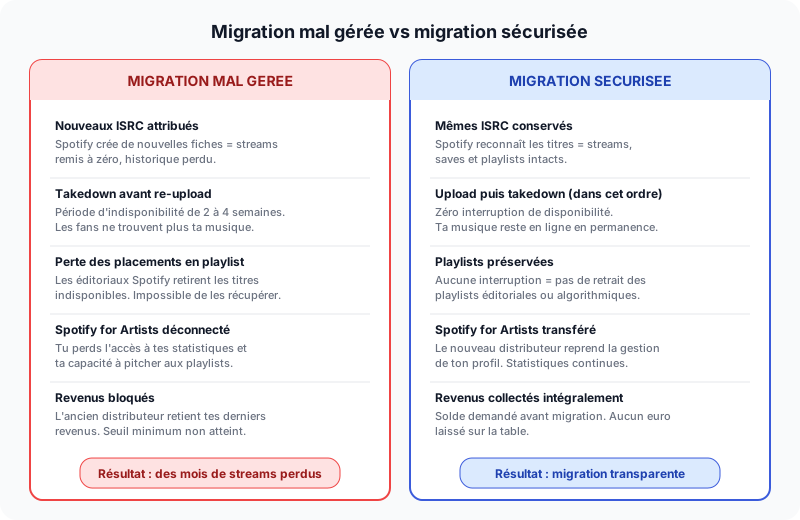
On the left, the consequences of a rushed migration. On the right, what happens when you follow the correct procedure.
The crucial role of ISRC and UPC codes
If you retain one single thing from this article, let it be this: your ISRC and UPC codes are the key to migration.
The ISRC identifies each recording
The ISRC is assigned to each individual track. It is what allows Spotify to know that “Track X” distributed by your new distributor is the same as “Track X” distributed by your old one. If the ISRCs match, Spotify handles the switch internally: your streams, saves, playlists — everything is preserved.
The UPC identifies each release
The UPC (Universal Product Code) — sometimes called EAN (European Article Number) in Europe — identifies a complete release: single, EP, or album. It works like a physical product barcode. Reusing the same UPC helps platforms recognize it is the same product.
How to retrieve your codes
Most distributors allow you to export your metadata, including ISRCs and UPCs. Here is how to do it with the main distributors:
| Distributor | How to export ISRCs/UPCs |
|---|---|
| DistroKid | Dashboard → Click on each release → ISRCs are displayed on the track page |
| TuneCore | My Music → Select the release → “Details” tab → ISRC and UPC displayed |
| CD Baby | Dashboard → Disc Details → Codes are in the disc metadata |
| Ditto Music | Releases → Click on the release → Codes visible in the details |
| iMusician | My Releases → Release details → CSV export available |
| RouteNote | My Music → Release → ISRC and UPC in the details |
Key takeaway: Export your ISRCs and UPCs before canceling anything. Some distributors block dashboard access once you request cancellation or stop paying your subscription. Do it first.
The complete procedure in 6 steps
Here is the exact procedure to migrate your catalog without losing a single stream. Follow it in order. Don’t skip any step.
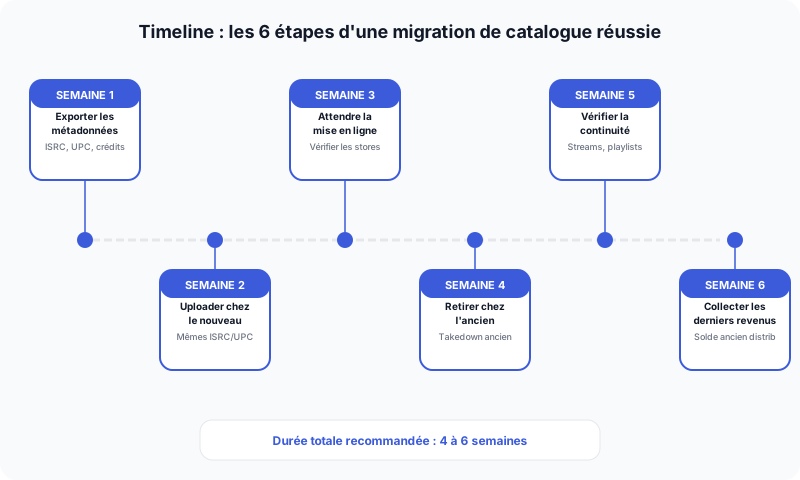
The full migration takes 4 to 6 weeks on average. Don’t rush it.
Step 1: Export all your metadata (Week 1)
Before anything else, you need to compile a complete migration file. This file contains:
- The list of all your tracks with their respective ISRCs
- The list of all your releases (singles, EPs, albums) with their UPCs/EANs
- The master audio files (WAV 16-bit / 44.1 kHz minimum)
- The artworks in high resolution (3000 x 3000 px minimum)
- Complete metadata: artist names, features, credits, lyrics, original release dates
- A statement of pending revenue with your current distributor
Create a spreadsheet with one row per track: track title, release name, ISRC, UPC, original release date, features, producer, songwriter-composer. This table will be your reference for verifying everything later.
Step 2: Upload to the new distributor (Week 2)
Create your account with your new distributor and start uploading your catalog. The absolutely critical element at this stage:
- Manually enter your existing ISRCs for each track
- Manually enter your existing UPCs for each release
- Never let the new distributor generate new codes
Most distributors offer an “Existing ISRC” or “Use existing ISRC” field during upload. If this field doesn’t exist, contact the new distributor’s support to ask how to reuse your ISRCs. If they tell you it is impossible, switch distributors — that is a red flag.
Also make sure to enter the original release dates. If your track came out on January 15, 2024, the release date at the new distributor must be January 15, 2024, not today’s date. Otherwise, the track will appear as a “new release” and may trigger the Release Radar algorithm incorrectly.
Step 3: Wait for delivery to go live (Week 3)
Once the upload is done, the new distributor will deliver your tracks to the platforms. This process generally takes 2 to 5 business days, but can stretch to 2 weeks depending on the distributor and catalog volume.
During this period:
- Regularly check that your tracks appear on Spotify, Apple Music, Deezer
- Compare the ISRCs displayed on platforms with those in your spreadsheet
- Verify that metadata (artist name, title, artwork) is correct
- Confirm that existing streams are still counted
Only proceed to the next step when 100% of your catalog is live via the new distributor.
Step 4: Request takedown from the old distributor (Week 4)
It is only after verifying everything is live with the new distributor that you request takedown from the old one. Depending on the distributor, takedown takes between 24 hours and 2 weeks.
When both distributors deliver the same track (same ISRC) simultaneously, Spotify and other platforms handle the conflict internally. This is not a problem: they simply switch the distribution source of the track. Your streams and data are preserved.
Step 5: Verify continuity (Week 5)
After the takedown from the old distributor, systematically verify:
- Your tracks are still live on all platforms
- Your stream counts haven’t changed
- Your playlist placements are still active
- Your Spotify for Artists profile is connected to the new distributor
- Your Apple Music for Artists profile works normally
If you notice an anomaly, contact your new distributor’s support immediately. Most migration issues can be resolved within the first 48 hours.
Step 6: Collect your final revenue (Week 6)
Your old distributor owes you revenue generated before the migration. Depending on the distributor, the payout delay for final revenue ranges from 1 to 6 months. Key points to watch:
- Minimum payment threshold: DistroKid, TuneCore, and others impose a minimum (often 10 to 50 euros) below which they don’t pay out. If your balance is under that threshold, you may never receive it.
- Reporting delay: streaming platforms pay distributors with a 2 to 3 month lag. Your old distributor may owe you revenue for several months after the migration.
- Account closure: don’t close your account with the old distributor until you have received all your revenue.
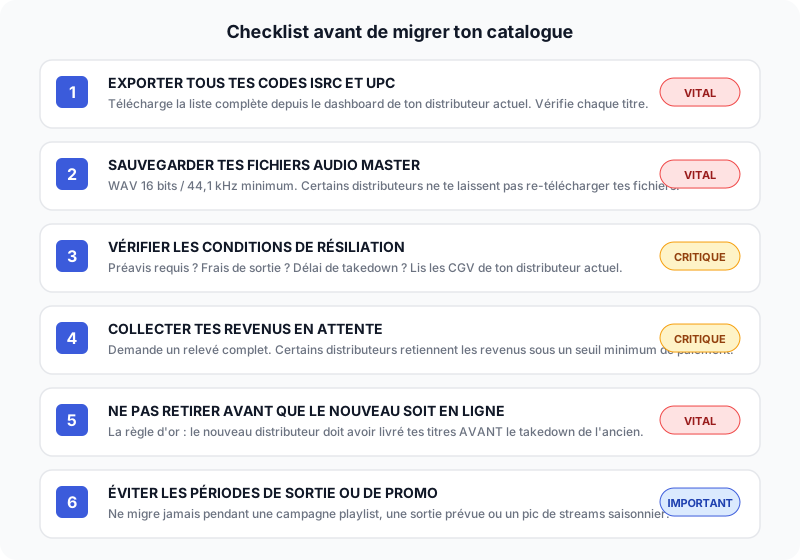
Print this checklist and tick each point before launching your migration.
The ideal timing for migration
When you launch your migration has a direct impact on risk. Here are the timing rules.
Best times to migrate
- January-February: slow period in the music industry. Fewer releases, less pressure on distributor teams, and you probably don’t have a release planned.
- After a release cycle: you just released an album, the promotion campaign is over, editorial playlists have rotated. This is the ideal moment.
- When you have no release planned for the next 8 weeks: migration takes 4 to 6 weeks. Add a safety margin.
Worst times to migrate
- During a playlist campaign: if you have tracks on editorial playlists, any interruption can get them removed.
- Close to a release: you need your Spotify for Artists access to pitch your upcoming release. Don’t risk losing it during migration.
- November-December: the holiday season is a high-listening period. Every day of unavailability costs more than during a slow period.
- On a Friday: support teams are reduced on weekends. If a problem arises, you wait until Monday to resolve it.
Key takeaway: The ideal migration starts on a Monday or Tuesday, during a slow period, with no release planned for the following two months. Allow a minimum of 4 weeks and a maximum of 8 weeks for the entire process.
What each distributor requires on departure
Not all distributors handle migration the same way. Here is what you need to know for the main ones.
DistroKid
DistroKid uses a subscription model. If you stop paying, your tracks are automatically removed from stores after a grace period. This is a major risk if you haven’t planned ahead for the migration. Another quirk: DistroKid doesn’t allow easy bulk ISRC export. You have to go track by track.
Advice: export all your ISRCs and UPCs before canceling your subscription. Once the subscription expires, you lose dashboard access.
TuneCore
TuneCore also works on an annual per-release subscription basis. If you don’t renew, your tracks are removed. However, TuneCore does let you view your ISRCs and UPCs even after the subscription ends, as long as you don’t close your account.
Since being acquired by Believe, TuneCore also offers a commission-based model. Check which model you are on before leaving.
CD Baby
CD Baby is one of the few distributors that won’t remove your music if you stop paying (since it is a one-time payment). However, CD Baby charges a lifelong 9% commission on your revenue. Even after migration, CD Baby will continue to collect its commission on streams generated before the takedown, during the platform reporting lag (2-3 months).
Ditto Music, iMusician, RouteNote
These distributors have varying policies. The common thread: they generally allow you to reuse your existing ISRCs if you request it. Contact their support before starting the migration to confirm the procedure.
Spotify for Artists and Apple Music for Artists: what happens?
Spotify for Artists
Your Spotify for Artists profile is linked to your distributor through a “claiming” system. When you switch distributors:
- The new distributor must claim your artist profile with Spotify
- Spotify verifies that the new distributor is indeed distributing your tracks (via ISRCs)
- The management transfer takes a few days
- You keep access to your historical stats
During the transition, there may be a 48 to 72-hour window where you temporarily lose dashboard access. This is fine, as long as you don’t have a playlist pitch in progress.
Apple Music for Artists
The process is similar. Apple Music for Artists is less dependent on the distributor than Spotify for Artists. Your access is tied to your Apple ID and your artist identity verification, not directly to the distributor. The transition is therefore generally smoother.
YouTube Music and YouTube Content ID
If you were using YouTube Content ID through your old distributor, migration can create claim conflicts. Your old and new distributors both claim the same recordings. YouTube typically takes 2 to 4 weeks to resolve these conflicts. During this time, revenue from your videos may be put on hold.
Ask your old distributor to release their Content ID claims as soon as the takedown is complete.
Migration with Muzisecur: zero stress, zero loss
At Muzisecur, we know catalog migration is a stressful moment. That is why we offer a free assisted migration service for all artists and labels who join us.
What Muzisecur does for you
- Full catalog audit: we verify every ISRC, every UPC, every piece of metadata before starting
- Upload and verification: our team handles re-distributing your catalog with the right codes, in the right order
- Timing coordination: we make sure delivery on our end is live before giving you the green light for takedown at your old distributor
- Spotify for Artists transfer: we handle the artist profile claiming
- Post-migration monitoring: for 30 days after migration, we monitor that everything works correctly
Why is migration free?
Because Muzisecur is not just a distributor. It is a complete ecosystem for artists and labels: distribution, rights management, publishing, accounting, strategic support. Migration is our front door, and we want it to be flawless.
We don’t charge for migration because we know that if it goes well, you will stay. And if you stay, it is because our full range of services brings you real value — not because you are stuck out of fear of re-migrating.
Key takeaway: Catalog migration to Muzisecur is free, assisted by our team, and guaranteed with no stream loss. Contact us to plan your migration.
FAQ: catalog transfer
Will I lose my streams if I switch distributors?
No, as long as you reuse the same ISRC codes. If you re-distribute your tracks with the same ISRCs, Spotify and other platforms recognize them as the same recordings. Your streams, saves, and playlists are preserved.
How long does a catalog migration take?
On average, 4 to 6 weeks from start (metadata export) to finish (post-migration verification and final revenue collection). Duration depends on catalog size and distributor responsiveness.
Can I keep my ISRCs when switching distributors?
Yes, in virtually all cases. ISRCs belong to you (or the first owner of the recording). They are not the distributor’s property. The new distributor must allow you to enter your existing ISRCs during upload.
My current distributor refuses to give me my ISRCs. What do I do?
This is rare, but it happens. You can find your ISRCs through Spotify (in track metadata, accessible via the API or third-party tools) or through the IFPI ISRC system (isrcsearch.ifpi.org). As a last resort, contact the organization that issued your ISRCs (often SCPP or SPPF in France).
Can I migrate only part of my catalog?
Yes. You can choose to migrate certain releases and leave others with your current distributor. This is actually a good strategy if you want to test a new distributor before transferring everything.
What happens if both distributors deliver the same track at the same time?
During the transition phase, it is normal for both distributors to deliver the same track (same ISRC) to platforms. Spotify and others handle this conflict internally: they switch the distribution source. There is no duplication of the track and no loss of streams.
Are my pre-saves and Spotify followers preserved?
Yes. Followers on your Spotify artist profile and pre-saves for your future releases are tied to your artist profile, not to your distributor. They are preserved during migration.
What is the best distributor for a smooth migration?
Every distributor has strengths and limitations. The essentials are that it lets you reuse your ISRCs and UPCs, offers responsive support, and handles Spotify for Artists claiming. At Muzisecur, we check all those boxes and walk you through the process. To compare options, see our digital distribution comparison.
Conclusion
Switching distributors is not a decision to take lightly, but it is not an insurmountable operation either. The key is preparation. If you export your metadata before starting, reuse your ISRCs and UPCs, wait for the new distributor to deliver before removing from the old one, and pick the right timing — your migration will be completely seamless.
The artists who lose streams during migration are those who improvise, who don’t check their ISRCs, or who blindly trust a distributor that says “we’ll handle everything” without verifying anything.
If you want to migrate without stress and without risk, Muzisecur offers a free assisted migration. Our team handles the entire process: audit, upload, verification, Spotify for Artists transfer, and post-migration monitoring. You only need to do one thing: send us your files and metadata. We handle the rest.
Your music deserves to stay online, with its streams, playlists, and history intact. Don’t let a botched migration destroy what you have built.
Related articles

Monetizing Your Music on YouTube, TikTok, and Instagram: Content ID, Social Distribution, and Revenue
Content ID, UGC, social distribution: learn how to earn money when your music is used on YouTube, TikTok, and Instagram in 2026.

How Much Does a Stream Pay on Spotify, Apple Music, Deezer in 2026?
Real streaming figures in 2026: how much each platform pays per stream, why it varies, and how to maximize your revenue as an independent artist.

Releasing a Single Independently: The Complete A-to-Z Checklist
From finalizing the master to playlist pitching, the 15 essential steps to release a single independently without missing anything. Actionable checklist and mistakes to avoid.